Memory (RAM)
memory. main memory. random access memory. random-access memory. DRAM. working memory. what is RAM. what does RAM stand for. what is the difference between RAM and storage. why does RAM lose everything when the power is off. what does random access mean. what happens when a computer runs out of RAM
⏱ 6 min read
In one sentence: RAM (Random Access Memory) is the computer's fast, temporary working memory: a row of numbered bytes that holds the programs and data in use right now, and is erased when the power goes off.
Why should I care?
In What is a Computer?, you met a cook who keeps the food in use on the table, and the rest in the fridge. The table is the computer's memory, also called RAM.
You use RAM all the time. Every tab open in your browser keeps its data in RAM.
Analogy
Think of a long wall of numbered lockers: locker 0, locker 1, locker 2, and so on. Each locker holds one small piece of paper.
Think of the CPU (the part of the computer that follows a program's instructions) as the person who uses these lockers. It can say "read locker 5,000" or "put this paper in locker 12". It does not have to open lockers 1 to 4,999 first.
Where the analogy breaks down: a real locker can be empty. A cell in RAM is never empty: it always holds some pattern of 0s and 1s. And RAM, unlike a locker, loses everything when the power goes off.
How it actually works
A long row of numbered bytes
RAM is a long row of storage places called cells. In most computers, each cell holds one Byte (8 bits). Each cell has its own number, called its address. Addresses start at 0 and go up one by one.
address:   0          1          2          3         ...
content:  01001000   01101001   00100001   00000000   ...
Diagram: memory as a row of cells. Each cell has an address (its number) and holds one byte.
Bigger things, such as a photo or a program, use many cells next to each other.
The CPU reads and writes
The CPU can do two things with memory:
- Read: get the byte stored at an address.
- Write: store a new byte at an address. The old byte in that cell is replaced.
RAM holds two kinds of things: the code (the program's instructions) and the data the program is working with. When you open an app, the computer copies its code from Storage: HDD and SSD into RAM. Then the CPU reads the instructions from RAM, one after another.
What "random access" means
"Random access" means the computer can reach any cell in about the same time, wherever it is. It does not have to go through the cells in order. (Here, "random" does not mean "by chance".)
Compare this with a music tape. To reach a song in the middle, the player must move along the tape, so the time depends on where the song is.
Why RAM forgets
Most RAM today is DRAM (Dynamic RAM). It stores each bit as an electric charge in a part called a capacitor: a very small container for charge. A The Transistor: an Electric Switch next to it works as a switch. It lets the computer read or change that charge.
The charge slowly leaks away. So the computer must refresh it: regularly read every bit and write it back. When the power goes off, the refreshing stops and the bits are lost.
RAM is called volatile: it keeps its content only while it has power. If the power goes off while you are writing a document, you lose the changes you did not save.
DRAM comes as memory chips. In many desktop computers and servers, they sit on a small board called a memory module. Electrical contacts along one edge connect it to the computer.
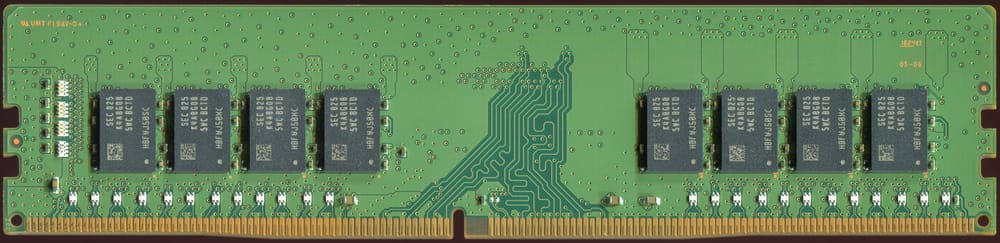 ChipContacts

Fast, but costly
Why not keep everything in RAM? Per byte, RAM costs much more than storage, and it is volatile. Storage keeps files, but it is much slower than RAM.
When RAM is nearly full, the computer can move some of its content out to storage to make room. Because storage is slower, doing this too much makes the computer slow. Sometimes it cannot open a new tab or program at all, because all the RAM is in use.
How it came to be
In August 1953, the Whirlwind computer project at MIT (the Massachusetts Institute of Technology), led by Jay Forrester, demonstrated the advantages of magnetic core memory for the first time. It used small rings of magnetic material called cores. Each core stored one bit: its magnetism pointed one of two ways. Core soon became the preferred main memory (the job RAM does today). Unlike today's RAM, it kept its bits when the power was off.
In October 1970, the company Intel introduced the 1103, a DRAM chip that held 1,024 bits. The Computer History Museum calls it "the first semiconductor chip to seriously challenge magnetic cores". Later DRAM chips used a memory cell with a single transistor, which IBM researcher Robert Dennard had patented a few years earlier. (A patent is an official record of an invention.) During the 1970s, chip memory replaced core memory.
🧪 Try it in your browser
Your browser can show how much memory each tab uses. You need a computer with a keyboard.
Safety rule: only look. Do not click End process or any other button in the list: it can close your tabs.
- In Chrome, Edge or Firefox, open any ordinary web page, for example
https://example.com. - Press
Shift+Esc. A list of your tabs and other browser parts opens. In Chrome and Edge, it is the Task Manager, in a small separate window. In Firefox, it is the Process Manager, in a new tab.- If nothing happens in Chrome or Edge (for example on some Mac computers), open the browser menu (the three dots), then More tools, then Task manager (in Edge: Browser Task Manager).
- You can ignore every row except your tabs. Find the column called Memory or Memory footprint. It shows how much memory each item uses, in kilobytes (K or KB) or megabytes (MB).
- Find the row for the example page. It may show the page's title, "Example Domain", or its address. Write down its memory number.
- Open a new tab with a bigger page, for example
https://en.wikipedia.org/wiki/Computer. Then go back to the list and look again. - Close the Wikipedia tab, go back to the list, and look once more.
What you should see: in step 5, a new row appears with its own memory number. In step 6, that row disappears. The exact numbers differ on every computer.
What this shows: every open tab uses its own part of the computer's memory, until you close it.
Common misunderstandings
- "RAM and storage are the same thing." No. RAM is fast and temporary. Storage keeps files even with the power off. When a phone has "128 GB", that is storage, not RAM.
- "Saving a file puts it in RAM." No. A file you are working on is in RAM. Saving copies it to storage, so it survives when the power goes off.
Recap
- RAM is a long row of numbered cells, usually one byte each.
- The CPU reads and writes RAM. RAM holds the programs and data in use right now.
- RAM is fast but volatile: it loses everything when the power goes off. Storage keeps files.
Sources
- Wikipedia, Memory refresh: https://en.wikipedia.org/wiki/Memory_refresh
- Wikipedia, Dynamic random-access memory: https://en.wikipedia.org/wiki/Dynamic_random-access_memory
- Stanford CS101, Computer Hardware: https://web.stanford.edu/class/cs101/hardware-1.html
- Stanford CS101, Running and Operating Systems: https://web.stanford.edu/class/cs101/software-1.html
- Emory University CS255, Structure of the computer memory: https://cs.emory.edu/~cheung/Courses/255/Syllabus/4-intro/SLIDES/s13a.html
- Emory University CS255, The operations that the CPU can perform on the memory: https://cs.emory.edu/~cheung/Courses/255/Syllabus/4-intro/SLIDES/s14a.html
- Wikipedia, Random-access memory (general background reference): https://en.wikipedia.org/wiki/Random-access_memory
- Wikipedia, DIMM (general background reference): https://en.wikipedia.org/wiki/DIMM
- Computer History Museum, 1953: Whirlwind computer debuts core memory: https://www.computerhistory.org/storageengine/whirlwind-computer-debuts-core-memory/
- Computer History Museum, 1970: Semiconductors compete with magnetic cores: https://www.computerhistory.org/storageengine/semiconductors-compete-with-magnetic-cores/
- Chrome for Developers, Fix memory problems: https://developer.chrome.com/docs/devtools/memory-problems
- Microsoft Edge Developer documentation, Monitor memory use in realtime (Browser Task Manager): https://learn.microsoft.com/en-us/microsoft-edge/devtools/memory-problems/microsoft-edge-browser-task-manager
- Firefox 108.0 release notes: https://www.firefox.com/en-US/firefox/108.0/releasenotes/
- Firefox source code, Process Manager page text: https://searchfox.org/firefox-main/source/toolkit/locales/en-US/toolkit/about/aboutProcesses.ftl
Written with AI · Reviewed by AI · Not yet checked by a human
Found a mistake, or something you did not understand? Report a problem.