The Physical Internet: Cables, Undersea Lines, Data Centers
undersea cable. submarine cable. submarine communications cable. subsea cable. fiber optic cable. optical fiber. fiber. data center. data centre. cable landing station. TAT-8. Submarine Cable Map. is the internet physical. how does the internet cross the ocean. what are undersea internet cables. does the internet use satellites. what is a data center. what is fiber optic cable
⏱ 6 min read
In one sentence: The internet is a physical thing: glass fiber cables on land and under the oceans carry much of its data as light, and buildings called data centers hold the computers that run websites and apps.
Why should I care?
When you open a website from another continent, the page arrives in a moment. But how did it cross the ocean? You might guess "satellites". The real answer is mostly cables on the floor of the sea.
In Internet Service Provider (ISP), you saw that your ISP links your home to other networks. This lesson shows what those links are made of, and where websites are kept.
Analogy
Think of the roads and warehouses of the world. The line to your home is a small street. Your ISP's cables are the main roads. Routers are the crossroads. Undersea cables are long tunnels under the sea, between continents. And data centers are huge warehouses, where the goods (websites and apps) are kept and sent out.
Where the analogy breaks down: on a road, real goods travel, and each truck carries only its own load. In a cable, nothing solid travels: only signals of light or electricity. One cable carries data for many people at the same time. And a warehouse sends away the item it stores. A data center sends a copy of the data and keeps the original.
How it actually works
Glass fibers that carry light
Undersea internet cables, and many links on land, use optical fiber: a thin strand of very pure glass that carries light. The Fiber Optic Association says the strands are "hair-thin". Most glass fibers are 125 microns (0.125 mm) wide, including the cladding described below.
TeleGeography, a research company of telecom (telephone and data network) experts, explains how data travels. Lasers (devices that make a narrow beam of light) at one end fire light down the fibers "at extremely rapid rates". Receptors at the other end detect it. (How light carries your data is beyond this lesson.)
Why does the light stay inside the glass? A fiber has a core in the center, surrounded by a layer of glass called the cladding. The two kinds of glass are chosen so that the light reflects off the edge of the core, back into the core, a bit like a mirror. This is called total internal reflection. A plastic coating protects the glass.
Cables under the oceans
A submarine cable (undersea cable) lies on the seabed between stations on land. Some numbers from TeleGeography:
- "As of 2026, we track more than 600 active and planned submarine cables."
- "As of early 2026, we believe there are over 1.5 million kilometers of submarine cables in service globally."
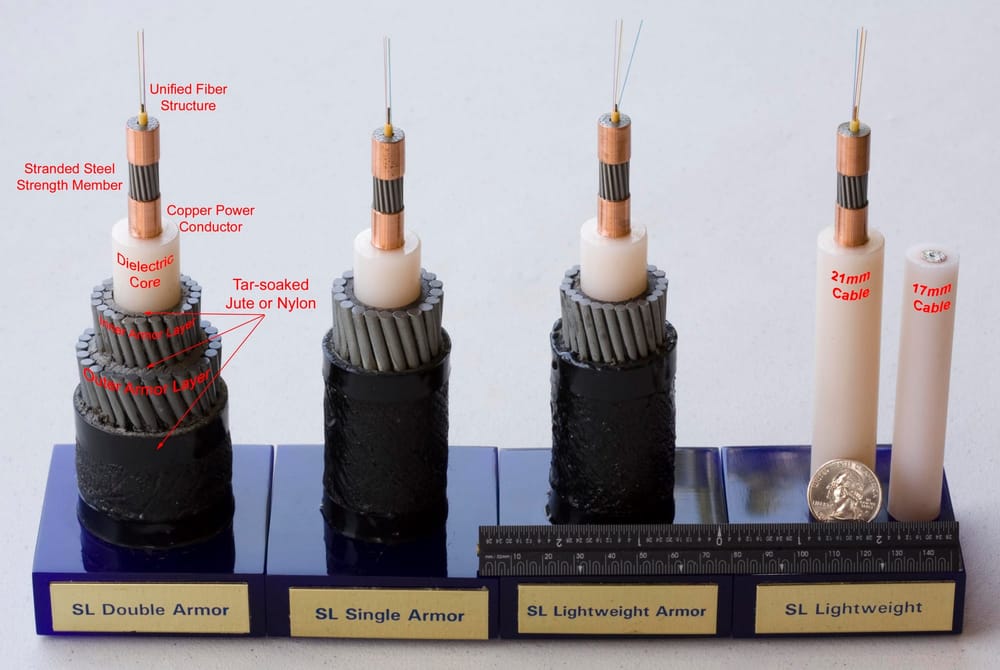
- "For most of its journey across the ocean, a cable is typically as wide as a garden hose."
In the deep sea, cables lie directly on the ocean floor. Near the shore, they are buried under the seabed for protection. Special ships put the cables in place.
Light loses strength as it travels through a very long fiber. So long undersea cables have repeaters at regular intervals: devices that make the light signal stronger again. Repeaters need electricity, so the cable also has a conductor (a material, such as copper, that lets electric charges flow easily) near its center. Electricity for the repeaters runs down it.
 FibersCopper

Cables can break. TeleGeography says accidents, such as fishing boats and ships dragging their anchors, cause two-thirds of all cable faults (damage).
Data centers
A data center, IBM says, is a room, building or facility that houses computers, storage and network equipment. Inside, there are rows of servers: "powerful computers that deliver applications, services and data to end-user devices", such as your phone.
Servers are stacked "on top of each other in a rack to save space". A rack holds many servers, one on top of another. Switches, routers and fiber carry data between the servers, and out to users. A data center must keep running all the time, so it has cooling systems for the heat, batteries for short power cuts, and generators for longer ones.
The picture below shows, simplified, how a web page can reach you from a data center on another continent. In real life, data often crosses several networks on the way.
How it came to be
You do not need to remember these dates.
Undersea cables are older than the internet. The first ones were laid from the 1850s and carried telegraph messages. In 1866, a telegraph cable from Ireland to Newfoundland (today part of Canada) made a permanent link across the Atlantic Ocean.
The first fiber cable across an ocean was TAT-8. It "entered service 14 December 1988", between North America and Europe. Its capacity equaled 40,000 telephone circuits (phone connections). Fiber needed "far fewer repeaters and thinner cable than the copper submarine cable" used before.
🧪 Try it in your browser
You will see the real undersea cables of the world on a map. These steps change nothing.
- Open TeleGeography's free map:
https://www.submarinecablemap.com - Wait for the map to load. What you should see: a world map with many colored lines across the oceans. Each line is one submarine cable. (TeleGeography says the routes are drawn in a simple style, not at their exact places.)
- Zoom in on an ocean, so the lines are easier to tell apart. Then click (on a phone, tap) any line. What you should see: a panel (on a computer, on the right) with facts about that cable: its name, its "ready for service" date (when it was, or will be, ready to use), its length in kilometers, its owners, and its landing points: the places where it comes onto land.
- Find the search bar on the page and type the name of your country in English. What you should see: the cables that land in your country. If your country has no sea coast, you may see none. Then try a neighbor that has a coast.
- Click an empty part of the map. TeleGeography says this "returns the map to its original state".
Common misunderstandings
- "The internet crosses oceans by satellite." Mostly not. TeleGeography says satellites still carry some international traffic (between countries), but "it's a very small percentage". It says cables can carry far more data, for much less money.
- "My phone is wireless, so my data never uses cables." Not true. Your phone uses radio to reach a base station: the nearby radio equipment of a mobile network. From there, Ericsson says, the link to the mobile company's main network is "typically" fiber or a microwave link (a wireless link, without cables).
Recap
- Undersea cables and many links on land carry data as light, in hair-thin glass fibers.
- TeleGeography tracks more than 600 active and planned submarine cables. Satellites carry only a very small part of international traffic.
- Data centers are buildings full of servers in racks, with fiber links, cooling and backup power. Websites and apps run there.
Sources
- TeleGeography, Submarine Cable Frequently Asked Questions: https://www2.telegeography.com/submarine-cable-faqs-frequently-asked-questions
- TeleGeography, About Us: https://www2.telegeography.com/about-us
- TeleGeography, Submarine Cable Map: https://www.submarinecablemap.com/
- The Fiber Optic Association, Optical Fiber: https://www.thefoa.org/tech/ref/basic/fiber.html
- The Fiber Optic Association, Total Internal Reflection: https://www.thefoa.org/tech/ref/basic/total_internal_reflection.html
- IBM Think, What is a data center?: https://www.ibm.com/think/topics/data-centers
- Engineering and Technology History Wiki, Milestones: Trans-Atlantic Telephone Fiber-Optic Submarine Cable (TAT-8), 1988: https://ethw.org/Milestones:Trans-Atlantic_Telephone_Fiber-Optic_Submarine_Cable_(TAT-8),_1988
- Engineering and Technology History Wiki, Milestones: Landing of the Transatlantic Cable, 1866: https://ethw.org/Milestones:Landing_of_the_Transatlantic_Cable,_1866
- NASA Space Place, What Is a Laser?: https://spaceplace.nasa.gov/laser/en/
- SparkFun Learn, What is Electricity?: https://learn.sparkfun.com/tutorials/what-is-electricity/all
- Ericsson, Radio Access Network (RAN): https://www.ericsson.com/en/ran
- Wikipedia, Submarine communications cable (general background reference): https://en.wikipedia.org/wiki/Submarine_communications_cable
Written with AI · Reviewed by AI · Not yet checked by a human
Found a mistake, or something you did not understand? Report a problem.